Super Ea
DEALER LOTS
Good one from my Compadre Alejandro Galindo from https://www.mql5.com/go?link=http://www.elcactus.com
I believe he released the new V1.2, see the web site for instruction and new releases
The parameters for the expert
TakeProfit = 40; // Profit Goal for orders opened
Lots = 0.01; // We start with this lots number, 0.01 for micro accounts and 0.1 for mini and normal accounts
StopLoss = 0; // StopLoss
TrailingStop = 20;// Pips to trail the StopLoss
MaxTrades=10 // Maximum number of orders to open (0.1, 0.2, 0.4, 0.8, 1.6, 3.2, 6.4, 12.8, 25.6, 51.2)
Pips=15 // Distance in Pips from one order to another
SecureProfit=10 // If profit made is bigger than SecureProfit we close the orders
AccountProtection=1 // If one the account protection will be enabled, 0 is disabled. This feature does not work as i wanted.
AllSymbolsProtect=0 // if one will check profit from all symbols, if cero only this symbol
OrderstoProtect=3 // Number of orders to enable the account protection
ReverseCondition=0 // if one the desition to go long/short will be reversed
StartYear=2005 // Year to start (only for backtest)
StartMonth=1 // month to start (only for backtest)
EndYear=2006 // Year to stop trading (backtest and live)
EndMonth=12 // Month to stop trading (backtest and live)
mm=0 // if one the lots size will increase based on account size
risk=12 // risk to calculate the lots size (only if mm is enabled)
AccountisNormal=0 // Cero if account is mini/micro
MagicNumber=222777 // Magic number for the orders placed
Manual=0 // If set to one then it will not open trades automatically
OpenOrdersBasedOn=2 // Method to decide if we start long or short. Te actual values for this parameter are:
0. MACD
1. Pivot price level
2. Support/Resistance levels (best results on all symbols)
TimeZone=16 // Time zone to calculate the pivots (not all the methods uses it)
Dealer Lots is based on 10 p 3 and My Compadre Alejandro Galindo fix some bugs I check his web and ha release the new DLM V1.2
but he don't realese the source code but you stil can tested and used on demo and live acc
I got the EA but I can not posted here for Respect to the Galindo's Web Page
Policy 
GUIDE
Trade Like a Dealer
(And Avoid Death by a Thousand Stops)
by: Boris Schlossberg
from Stocks Futures Options
Instead of hating dealers, traders should learn to trade like them. The insights are worth the trouble.
A trader stares intently at the three-minute chart of the E-mini S&P contract on his computer and sees that prices are plummeting through the 20 period moving average. Instantly he sells several lots, anticipating a sharp move down. But suddenly, price action pauses, stabilizes and then quickly turns around, running back up beyond his entry point. He gets stopped out for a loss. Unfazed, he focuses on his screen once more and now sees that price has pierced the 20 EMA to the upside. His momentum indicators have turned bullish, and now he buys. At first, price follows his direction, turning his floating profit-and-loss statement green – but well short of his target price. The price hesitates again, halts for one more bar and then plunges below his entry and right into his second stop loss of the day. Dazed, he watches silently as it rallies once more and now takes out the daily high without him
What is this, you wonder. Day trading by Inspector Clousseau?
Hardly. This trader displayed enormous discipline and control. He adhered to his plan. He used proper money management techniques, and he even followed classic risk/reward ratios. In short, he did everything by the book. Yet most likely he will wind up just another victim of the market – destroyed not by the typical impulsive burn-out trades of most amateurs, but by the death of a thousand little stop-loss cuts
Why do most traders lose money even when they follow all the proper rules? – Because markets rarely offer a smooth trend. Instead, they usually thrust and retrace frequently, spooking traders out of what eventually turn out to be profitable positions. As a result, traders are beaten by maddening runs of constant stop outs. According to famous trading coach David Landry, a series of small stops often can add up to be bigger a loss than a large stop
Why does this happen? Markets are a zero-sum game. For every winner, there must be a loser. Winners’ profits come from the losers. The sooner retail traders understand that reality, the better are their chances of becoming profitable traders
And on the opposite side of most of retail transactions are professional traders known as dealers. One of the main reasons prices tend to back and fill in almost all financial instruments is because when customers are buying, dealers are selling and vice versa. Dealers make their profits from the small retraces in price by quickly unloading their newly acquired inventory. If that sounds like more like a scene from a chaotic Middle Eastern bazaar than some highly sophisticated, finely engineered process – it is. That’s why those with instincts of a pushcart vendor often become much better traders than Ivy League graduates with degrees in quantitative financ
Don’t Hate the Deale
Whether trading stocks, options, futures or forex, I’ve never heard a kind word from retail traders about dealers. They cheat, they steal, and they make markets wide enough to drive a Mack truck through. They back away from their quotes when markets get wild. And on and on and on. All true, but immaterial
In recent years, two factors have made markets fairer and more efficient for retail traders – competition and computerization. Presently, all major financial markets are fully electronic with strict price and time-stamp rules that provide traders with auditable results and lightning-fast execution. Often traders have the opportunity to join the dealers in buying on the bid and selling on the ask, thus completely leveling the playing field. In short, why be mad at the dealers for your own bad decisions? Dealers, after all, offer a necessary market service – liquidity. Don’t think so? Just try to get rid of a 100,000-share position after market hours if some adverse news hits the stock. Volatility takes on a whole new meaning when 33 percent of your position value disappears in less than a minute on what often is only a mildly bad piece of ne
Instead of hating dealers, traders should learn to trade like them. Unlike regular retail traders, dealers usually follow two maxims: Always be fading, and never trust the first price. The fact that dealers usually are on the opposite side of price action really should come as no surprise when one realizes that 80 percent of the time markets are range-bound – and, therefore, retrace the original move. During the 20 percent of the time when markets do trend, dealers often sustain losses. Tom Baldwin was a former meatpacker who started with a $25,000 grubstake and became one of the largest market makers in the Chicago Board of Trade’s Treasury bond pit, often turning over $1 billion of inventory per day. In an interview with Jack Schwager he said the following, “Because I’m a market maker, I take the other side of the trend. So if the market goes one way for 50 ticks, I can guarantee you I’m going the wrong way, and at some point it is going to be a
Typically when dealers incur trend risk, they chalk it up to cost of doing business. However, on some occasions the one-way moves are so severe and so relentless that dealers can go bankrupt. Witness the example of several NYSE specialist firms that continued to make markets during the 1987 stock market crash and sustained unrecoverable losses.
Scaling in – Not Averaging Dow
Although fading the trend may not be the rule most retail traders wish to follow, it is the dealers’ second trick that can be of tremendous help to retail speculators. In his very informative book, The Market Makers Edge, Josh Lukeman writes, “Successful market makers have controlled the ego-based need to be absolutely correct. Because markets are constantly in motion, it is almost impossible to be exactly right on (in your entries).” Such a probative approach to the markets is at the heart of most successful professional trading. Dealers know full well that their first foray into the trade is often wrong. They rarely commit the full position amount on the first t
One of the key differences between professionals and amateurs is that professionals scale into trades while amateurs average down. This statement may seem like clever wordplay, but it’s not. Let’s assume that both the professional and the amateur decide to risk two percent of their capital account on a particular trade. The professional knows full well that he will not be able to hit the exact entry point on his first attempt. Therefore, he may allocate only 0.3% of his capital to the first entry, 0.6% on the second and 1.2% to the third – and stop himself out at -2.7% away from original entry price (-2% ris
On the other hand, the amateur will plow in with a full two-percent position, and then when the trade goes against him, he may decide to “double down again” and then average in yet a third time. At this point, the amateur has committed six percent of his capital to the trade, and if the trade continues to move against him, he will throw in his towel with a massive -12% loss (sum of -6%,-4% and -2% losses). Five disasters like that and the amateur loses 60 percent of his account. In a zero-sum game, he has just moved much closer to zer
Over-Leverage and Diversification
This example serves to illustrate one of the greatest pieces of trading advice ever given. When asked by Jack Schwager what is the one act most traders must do to become successful, Bruce Kovner – perhaps the greatest hedge fund manager ever and a man who has beaten the markets for more than 30 years and to whom other hedge fund managers entrust their savings – simply said,” Undertrade, undertrade, undertrade.” Prodded further by Schwager, he explained, “Whatever you think your position ought to be, cut it at least in half. My experience with novice traders is that they trade three to five times too big. They are taking five- to ten-percent risks on a trade when they should be risking one- to two-per
Unfortunately, this is the advice most retail traders roundly ignore. It’s not exciting to trade for pennies and nickels – far more glamorous to try to make $1,000 a day. Yet that is the likeliest path to ruin. After having watched thousands of accounts trade, I can unequivocally say that the biggest reason for the failure of most retail traders is not lack of knowledge, nor is it the inability to understand the nuances of the market or poor technical analysis skills. The number one reason is over-leverag
Imagine you are driving down a typical suburban street in your subdivision at the normal 25 mph. Now imagine that the speed of the car suddenly accelerates to 250 mph. What are the chances that you will make it to the end of the block unharmed, especially if your neighbor is driving towards you from the other direction? That’s leverage. Professionals fully recognize its power and do not risk more than they control – and then they diversify their risk by not betting everything on one single pric
As investors, we are always taught that diversification is crucial to success in the market. Yet when it comes to trading, most speculators practice the “all-in approach.” Harry Markowitz, who in the 1950s was the first man to apply systematical statistical analysis to the market, demonstrated mathematically how the average of highly risky securities actually generates a smaller standard deviation (and therefore, smaller risk) than a uniform portfolio of presumably safe stocks. The math behind his discovery is beyond the scope of this article, but suffice it to say that this seeming enigma applies to diversification of price action as well. Getting a blended price often is less risky than plowing all at once into the trad
Applying Dealing Methods to Trend
While scaling may be appealing to many retail traders, trading against the trend probably will not appeal to most. So here is an example, and please note that it is only a suggestion and by no means a trading setup. Every trader must discover his own edge in the market – there is no such thing as easy money
Having dispensed with disclaimers, let’s examine one common strategy many retail traders like to follow – the break-out trade. Using dealing methodology, here is an approach to possibly make the trade less risky. As shown in Figure 1, the trader can scale into the trade three times. By diversifying his position, he does not even need to have price exceed his initial entry point to record a profitable trade! If, however, he is correct in anticipating the direction, he still can capture the move with a partial entry. Consequently, by modifying the risk, the retail speculator can improve his approach and truly begin trading like a deale
Aqilez,
Thanks for the braintrading Program. We'll see if it works as claimed or not. On your side what are your results like using the program?
BRAIN TREND
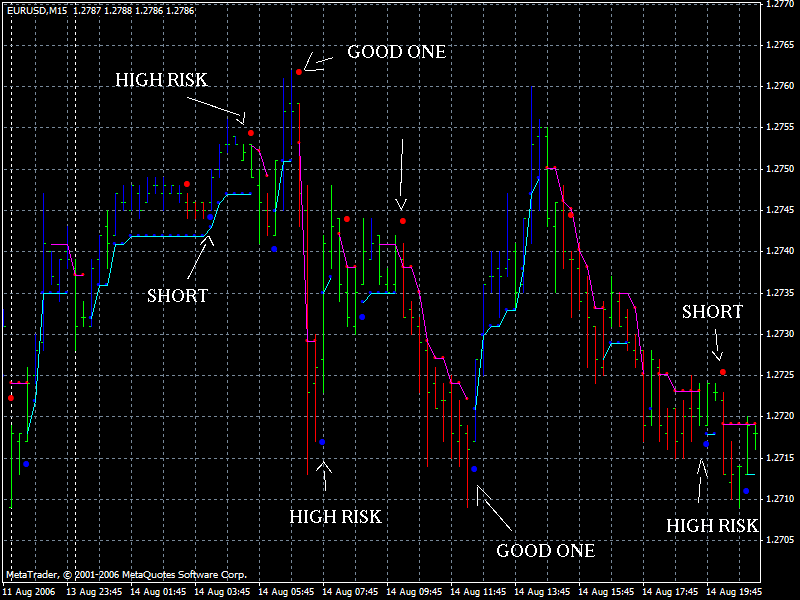
Good Result In 15 Minutes Time Frame Can Be Easy To Setup Same Pair In 2 Charts Example
Eur/usd 15 M
Brain Trend1 = Chart 1
Brain Trendsig1 = Chart 1
Etc Etc
Eur/usd 15 M
Brain Trend2 = Chart 2
Brain Trendsig2 = Chart2
Etc Etc
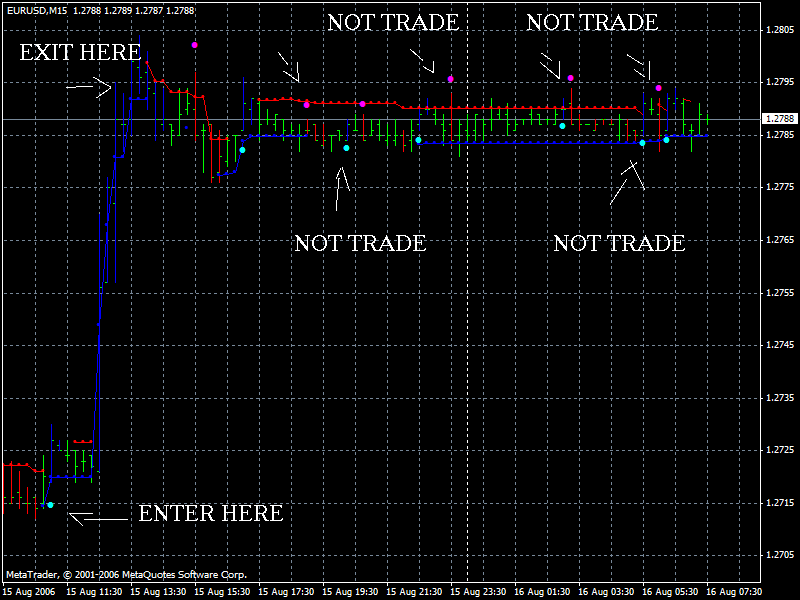
Green Trend = No Trade
Blue Trend = Trend Is Up
Red Trend = Trend Is Down
Note:
Trade Only When Both Signals Appear  AND TESTED MANY TIMES BEFORE YOU DECIDE GO LIVE I NOTICE DIFERET SIGNS DEPENDS OF ZOOM OF CHART AND SIZE OF MONITOR... SOME TIMES SIGNS APPEARS IN GREEN TREND MEANS HIGH RISK !UP TO YOU!
See EXAMPLE JUST ONE BRAIN TREND IN 1 CHART AND NOT TO TRADE ADVISE BECAUSE THE NUMBER OF GREEN'S
TRADE ONLY BEFORE MANY REDS OR MANY BLUE ONLY OR AFTER MANY RED'S OR BLUE'S FOLOWED OF 1 TO 3 GREEN
Thanks for the heads up, I'll be testing it out too.
Hi
There are too many indicators but little or not enough information about how to use them. why don't we try to explain how to use each one of those indicators to make things easier?
Regards
Aquilez Baeza Vergara

- Free trading apps
- Over 8,000 signals for copying
- Economic news for exploring financial markets
You agree to website policy and terms of use
DLMv1.1 IS THE WINNER AFTER PROVING ALL THESE SYSTEMS THE ONE THAT BROUGHT MORE PROFIT IT WAS DLMv1.1 CONTINUED BY BRAIN TREND, IN LAST PLACE I REMAIN CCI DUE TO THE GRADE OF DIFFICULTY WITH WHICH THE DEALS HAVE TO BE EXECUTED
IT IS IMPORTANT TO KNOW LIKE AND WHEN TO ACTIVATE AND TO DEACTIVATE THIS EA THE SELECT PROPERTIES THE CHOSEN MARKET AND THE SELECTION OF PIPS OR THE OPCCION MM ARE FUNDAMENTAL FOR SUCCESS
IMPORTANT NOTE: THE RESULTS BETWEEN EVERY ACCOUNT AND EVERY INDIVIDUAL ARE DIFFERENT IN ACCORDANCE WITH THE ENTIRE BALANCE OF THE ACCOUNT OR THE USE OF MONEY MANAGER
THIS SYSTEM IS BASED ON TRADE LIKE A DEALER
FOR MANY PEOPLE THIS SYSTEM DOES NOT WORK BECAUSE THE EA WORKS UNLIKE THE MARKET (FOR EXAMPLE IF THE MARKET LOWERS THE EA TENDS TO BUY AND THE OTHER WAY ROUND)
IT IS IMPORTANT TO UNDERSTAND THE SYSTEM BEFORE USING THE EA
FURTHER DOWN THERE IS A GUIDE IT IS NECESSARY TO READ IT AND TO UNDERSTAND WHICH IS THE INTENTION